
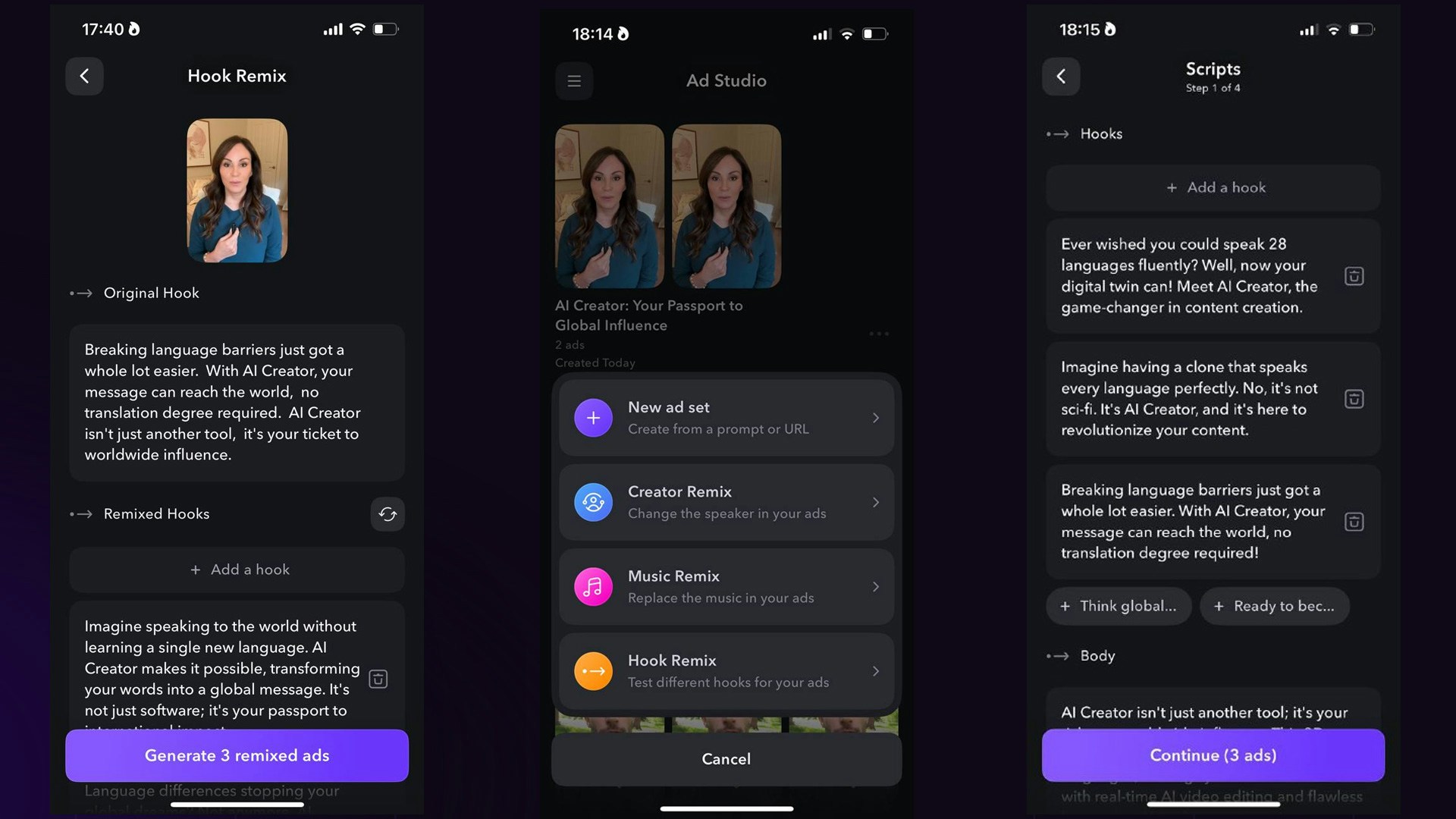
Create an ad set
1
Enter your website or prompt
Tap on Create ads -> New ad set. Then, you have three video script options:
- Generate scripts automatically based on a prompt
- Enter custom scripts
- Enter a product URL and have the app generate scripts.
2
Adjust the scripts
Based on your product, we’ll automatically generate scripts with a main body and various hooks. You can edit the script’s body and add additional hooks.
3
Select creators and generate the ad set
You can select up to 5 creators for your ad set, with each creator generating 3 ads. After selecting the creators, you can preview their voices narrating your script.
Creator Remix
1
Import your video clip
Tap on Create ads -> Creator Remix. Then, import your ad from your camera roll.
2
Select a creator and generate your video
Select creators to serve as the new speaker for your video ad. You can preview their voices before generating the ad.
Music Remix
1
Import your video clip
Tap on Create ads -> Creator Remix. Then, import your ad from your camera roll.
2
Choose a music track
Choose a music track or create a new one for your video based on a prompt.
Hook Remix
1
Import your video clip
Tap on Create ads -> Creator Remix. Then, import your ad from your camera roll.
2
Choose and adjust new hooks
We’ll generate new remixed hooks for your ad. Delete, edit, or add new hooks as needed.