Captions Help Center home page
English
Search...
⌘K
Ask AI
Sign Up / Sign In
Sign Up / Sign In
Search...
Navigation
Lipdub
Introduction
Captions
API
GET STARTED
Introduction
Sign Up & Sign In
Trouble with Sign In
Subscriptions & Plans
Support
PLATFORMS
iOS
Desktop (Web)
Android
GENERATE VIDEO
Prompt to Video (iOS)
Prompt to Video (Web)
AI Creator Video Generator Guide
AI Twin
AI Ads Creator for Marketing Videos
Lipdub
EDIT VIDEO
AI Edit - Automatic Video Editing Tool
Chat-Based Editing
Caption Your Video
AI Video Dubbing and Translation Guide
LINK TO VIDEO
AI Shorts
Reddit to Video
RECORD VIDEO
Script Generator
Camera & Teleprompter
AI FEATURES
AI Eye Contact
Media Overlay
Cutout
Music
Sound Effects
Denoise Audio
Censor
Zoom
Voiceover
Title
Text
TIMELINE EDITING
Add & Delete Clips
Split & Merge Clips
Reorder Shots
Trim
Shots & Transitions
Keyframes
Audio Tracks
SETTINGS
Scale
Export Your Project
Undo & Redo
Manage Projects
Captions Cloud
Delete Account
TROUBLESHOOTING
Lost or Missing Projects
Restore Your Subscription
Login Method Issues
Credits and AI Usage
Watermark on Exported Video
Transcription Failed
Can't Export or Download
On this page
あなたのビデオを新しい言語にLipdubしましょう
Lipdub
Copy page
AI Lipdubを適用すると、話者または話者たちが新しい言語で吹き替えされ、新しい言語に合わせて唇や顔の動きが追加されます
Copy page
この機能は近日公開予定です
あなたのビデオを新しい言語にLipdubしましょう
iOS
Desktop
Android
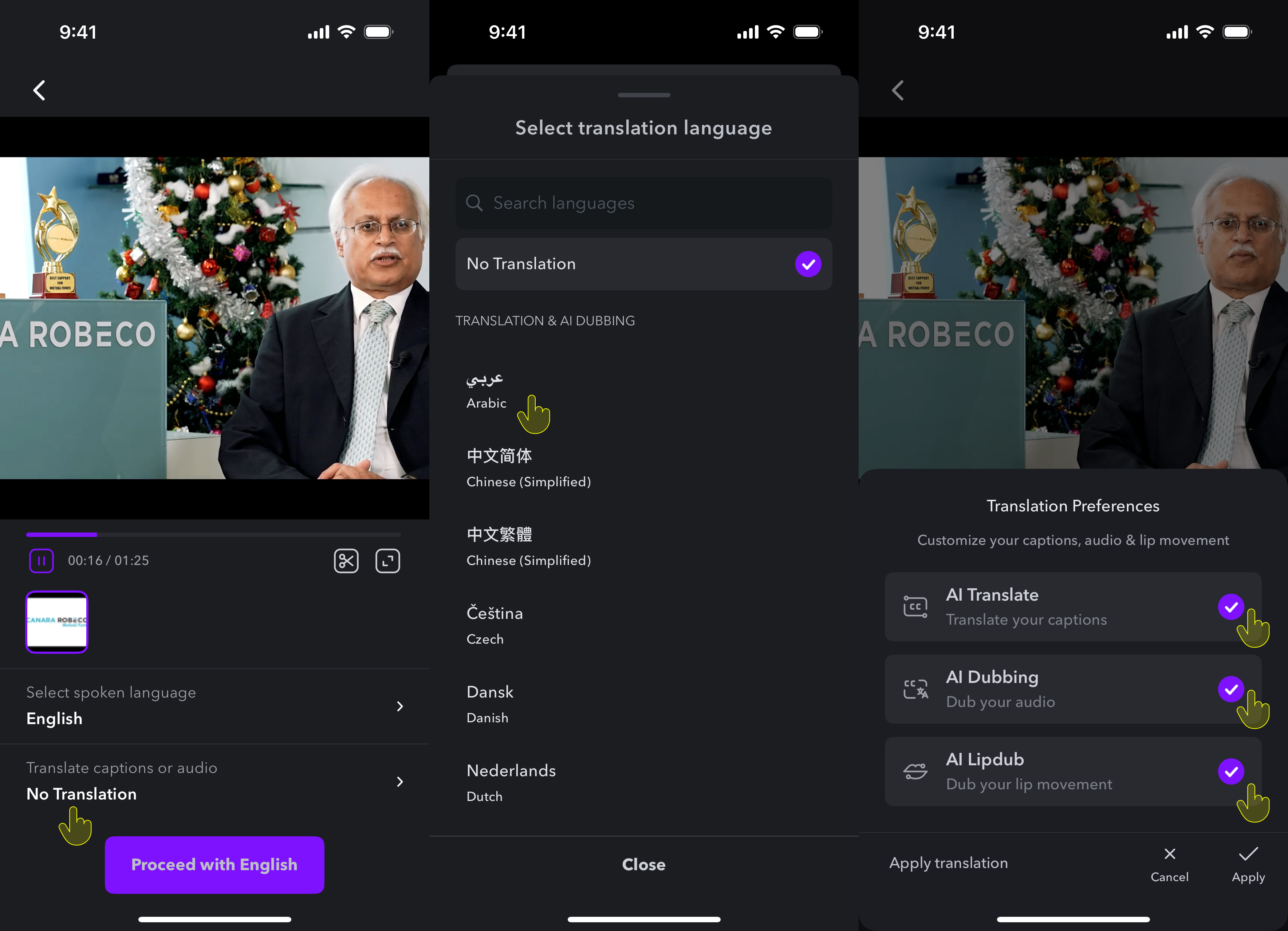
あなたのビデオを新しい言語にLipdubするには:
あなたのビデオを
インポート
または
録画
話されている言語を選択
翻訳したい言語を選択
AI Dubbing
と
AI Lipdub
をタップ
デスクトップには近日公開予定
Android
には近日公開予定。
Last modified on January 27, 2026
Was this page helpful?
Yes
No
⌘I
Assistant
Responses are generated using AI and may contain mistakes.